Convert Text
The Convert Text action converts text between HTML, Markdown, and Plaintext. Use it when one action provides content in one format and a later action or integration needs a different format.
When to Use This Action
Use this action when:
- You need HTML for an email body, ticket note, or API field
- You need Plaintext from an HTML email body or rich text response
- You need to convert Markdown from another action into HTML
- You want to normalize text before storing it for later actions
Don't use this action for:
- Simple text rendering: Use Render Text and Store as Variable when you do not need format conversion.
- Text extraction: Use Extract Strings or Perform a Regular Expression Match when you need to extract values.
- Advanced HTML layout conversion: This action handles common text formatting, not full web page layout preservation.
How It Works
- The action renders Text to Convert, including any text expressions.
- The action reads From Format and To Format.
- The action converts the rendered text into the selected output format.
- The action stores the converted string in the result variable you configure.
Configuration
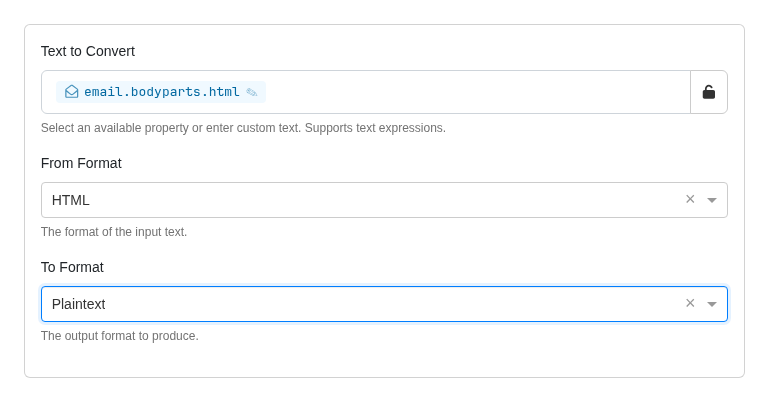
| Field | Description | Default |
|---|---|---|
| Text to Convert | Select an available property or unlock the field and enter custom text. Supports text expressions such as {{email.body}} or {{custom.previousResult}}. | Empty |
| From Format | The current format of the input text. Options: HTML, Markdown, Plaintext. | Plaintext |
| To Format | The format to produce. Options: HTML, Markdown, Plaintext. | HTML |
Format Notes
| Conversion | Notes |
|---|---|
| HTML to Plaintext | Removes HTML tags and returns readable text. |
| HTML to Markdown | Converts common tags such as headings, paragraphs, links, emphasis, code blocks, lists, blockquotes, images, and data tables. |
| Markdown to HTML | Converts Markdown to HTML and strips raw HTML from the Markdown input. |
| Markdown to Plaintext | Converts Markdown to HTML first, then returns readable text. |
| Plaintext to HTML | Escapes unsafe characters and preserves line breaks. |
| Plaintext to Markdown | Escapes Markdown control characters so the output preserves literal text. |
HTML output uses line breaks and indentation so the result is easier to read in history logs and later action steps.
HTML data tables convert to Markdown tables. If a table does not include header cells, the action uses the first row as the Markdown table header. The action may flatten presentation-oriented tables and complex layouts instead of preserving their original arrangement.
The action retains visible text from malformed nested lists instead of silently dropping it. Invalid list nesting may become a flat list in the Markdown output.
Returned Variables
When you configure Store the results in Variable, the converted text becomes available for subsequent actions.
| Variable | Type | Description |
|---|---|---|
| (root) | string | The converted text result |
Access the result with {{custom.<variableName>}}, where <variableName> is the variable name you assign to this action.
Examples
Convert an Email Body to Plaintext
| Field | Value |
|---|---|
| Text to Convert | {{email.bodyparts.html}} |
| From Format | HTML |
| To Format | Plaintext |
Use the result in an AI prompt, ticket summary, or plain text notification.
Convert Markdown to HTML
| Field | Value |
|---|---|
| Text to Convert | {{custom.markdownSummary}} |
| From Format | Markdown |
| To Format | HTML |
Use the result in an HTML email body or API field that expects HTML.